A SaaS stack audit is a structured inventory and reconciliation process that ends with one of six decisions for every application: keep, right-size, consolidate, renegotiate, replace, or retire. The immediate next step is reconciling finance records, like accounts payable and corporate cards, against identity data from your SSO or IDP. That single cross-check surfaces the shadow subscriptions and orphaned seats most audits miss, and it sets up the security review that has to happen alongside the cost review, not after it.
TL;DR:
- Regular reconciliation of multiple evidence sources, including AP records and SSO logs, is essential to build a complete and accurate SaaS inventory for effective decision-making.
- Prioritize applications based on usage, overlap, and security risk, focusing first on high-spend or high-risk tools to maximize immediate savings and security improvements.
- Continuously review user access and account activity, especially for orphaned accounts and excessive privileges, to reduce security risks and prevent unauthorized data access.
- Establish a recurring governance rhythm with monthly, quarterly, and bi-annual reviews to maintain visibility and prevent waste from re-emerging over time.
- Use a combination of cost, utilization, renewal timing, and redundancy metrics across multiple cycles to measure the ongoing effectiveness of SaaS spend improvement efforts.
Table of Contents
- What Does a SaaS Stack Audit Actually Examine?
- Why SaaS Spend Gets Away From Organizations
- How to Run a SaaS Stack Audit: A Step-by-Step Playbook
- Security and Access Review to Include in the Audit
- Building a Governance Rhythm That Prevents Relapse
- A 30/60/90 Checklist for the First Audit Cycle
- What Successful SaaS Audits Look Like in Practice
- Which Metrics Actually Tell You the Audit Worked
- Connecting Audit Findings to Business Strategy
- Common Pitfalls That Derail a SaaS Audit
- What This Audit Process Gets Wrong in Most Advice You’ll Read
- Where Commerce Catalyst Fits After the Audit Is Done
- Sources
- FAQ
What Does a SaaS Stack Audit Actually Examine?
A real audit is not a spreadsheet of renewal dates. It’s an inventory built on specific fields, cross-checked against multiple systems, that produces a defensible decision for every app your organization pays for.
The CIS Control 2 framework for software asset inventory recommends capturing, at minimum:
- Vendor and internal business owner
- Documented business purpose (not just a department name)
- Seats purchased versus active users
- Last-activity date and usage frequency
- Annual spend, contract term, and renewal date
- Integration dependencies (what breaks if this app disappears)
- Data classification (does it touch customer PII, financial records, or source code)
Each app then gets sorted into a decision category: keep as-is, right-size the tier or seat count, consolidate with an overlapping tool, renegotiate before the renewal window closes, replace with something cheaper or better integrated, or retire outright. That sixth category is where most of the savings hide, and it’s also where most audits stop being a finance exercise and start being a security one, because retiring an app without mapping its integrations is how you break a data pipeline nobody remembers building.
Why SaaS Spend Gets Away From Organizations
Most finance leaders discover their real SaaS spend is 20 to 40% higher than what’s in the budget line item. It’s rarely one big mistake. It’s five small, boring failure modes compounding quietly for two or three years.
- Shadow IT on personal cards. An employee expenses a $40 monthly tool nobody in IT ever approved, and it sits invisible in a reimbursement report instead of a software budget.
- Auto-renewal by default. Contracts renew because nobody flagged the 60-day cancellation window, not because anyone reviewed whether the tool still earns its cost.
- Orphaned licenses. An employee leaves, but the seat stays active, billed, and untouched for months.
- Tier creep. A team upgrades to the enterprise plan for one feature, then never downgrades once that project ends.
- Duplicate tooling. Marketing and sales each buy a project management tool that does the same job, unaware the other team already pays for one.
Pro Tip: Pull your last 12 months of corporate card statements and search for recurring charges under $100. That’s where personal-card shadow IT almost always hides, and it’s the fastest way to find apps finance never approved.
How to Run a SaaS Stack Audit: A Step-by-Step Playbook
This is the operational sequence. Skip a step and you’ll end up with a list of apps but no reliable basis for cutting any of them.
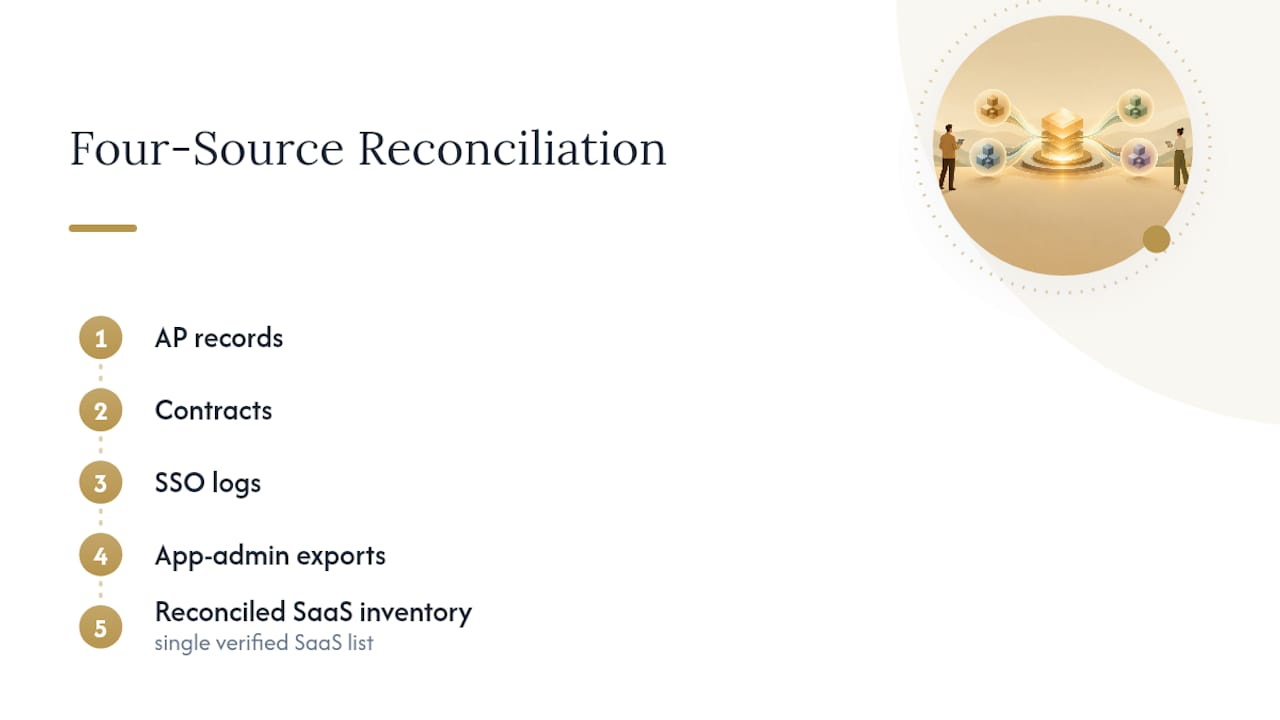
- Build the inventory. Reconcile four evidence sources at minimum: accounts payable and corporate-card transactions, your contract and invoice repository, your SSO or IDP application catalog, and direct app-admin exports. Add expense reports and browser or network discovery tools when you suspect shadow SaaS is widespread.
- Normalize and enrich the data. Every app gets an owner, a usage signal, a renewal date, its integration map, and a risk tag. An app with no assigned owner is itself a finding, not just a data gap.
- Score and prioritize. Rank apps on value delivered, actual usage, functional overlap with other tools, and security risk. This scoring is what turns a raw list into keep, right-size, consolidate, or retire decisions. Applying a rough 80/20 prioritization lens here, focusing first on the small number of apps driving most of the spend, gets you to savings faster than reviewing all 200 tools with equal attention.
- Reclaim seats and right-size tiers. Before you retire anything, document an export and retention plan and map what integrations need to be unwound. Cancelling a tool without that plan is how audits create new fires instead of putting them out.
- Negotiate or replace. Route every renewal decision through finance, IT or security, and the business owner together. A renewal nobody outside procurement reviewed is a renewal that renews on the vendor’s terms, not yours.
- Record and schedule the next review. Document what changed, assign an owner to each surviving app, and put the next check on the calendar. An audit that ends without a recurring cadence just delays the same problem by a year.
| Step | Primary evidence source | Typical outcome |
|---|---|---|
| Build inventory | AP records, SSO/IDP catalog, contracts | Complete app list with owners |
| Score and prioritize | Usage exports, admin panels | Ranked keep/cut list |
| Reclaim and right-size | App-admin seat reports | Reduced seat count, lower tier spend |
| Negotiate or replace | Contract terms, renewal calendar | Better pricing or replacement plan |
Industry guidance on SaaS spend improvement from BetterCloud makes the same point in different words: visibility into usage, spend, and ownership together is the foundation everything else builds on. Skip the reconciliation step and every later decision rests on guesswork.
Security and Access Review to Include in the Audit
A SaaS audit that only counts dollars misses half the risk. The other half lives in who has access to what, and whether that access still makes sense.
- Unsanctioned apps and risky integrations. Any tool connected to your core systems without security review is a potential data-exfiltration path, regardless of its price tag.
- Stale or orphaned accounts. Former employees and contractors whose access was never revoked are one of the most common findings in any account review.
- Unmanaged service accounts. Machine-to-machine credentials often outlive the project that created them, with no human owner tracking them.
- Excessive administrator privileges. Admin rights granted for a one-time setup task frequently never get downgraded afterward.
CIS Control 5 on account management calls for account inventories with recurring validation, at least quarterly, and documented owners for every service account. That cadence matters because access risk doesn’t stay static between annual reviews. A departing employee’s account sitting active for even one quarter is enough time for real damage, whether from negligence or malice.
Building a Governance Rhythm That Prevents Relapse
An audit fixes today’s problem. Without a recurring rhythm, the same waste rebuilds itself within 18 months, because nobody stopped the behaviors that created it in the first place.
- Monthly: Review new spend and flag unusual transactions before they become embedded habits.
- Quarterly: Validate active seats, confirm accounts still belong to current employees, and check which contracts renew in the next 90 days.
- Bi-annual: Refresh the full inventory and review the subscription policy itself, not just the app list.
The policy piece is what actually holds. Require a named owner and a documented business purpose before any new subscription gets approved, and route every renewal decision through finance, IT or security, and the business owner as a three-way sign-off, not a single click. CIS Control 2 frames this as both a cost and a control problem: recording why an app exists matters as much as recording what it costs.
Pro Tip: Put renewal dates on a shared calendar visible to finance and IT both, not buried in one person’s inbox. The single biggest cause of accidental auto-renewal is that only one person knew the date, and that person was on vacation when it mattered.
A 30/60/90 Checklist for the First Audit Cycle
Most audits fail not from bad analysis but from vague deadlines. A 30/60/90 structure forces decisions instead of endless data gathering.
In the first 30 days, pull AP and SSO exports, interview the owners of your top 20 spend items directly, and flag every renewal landing inside the next 90 days. In the next 30 days, run seat-reclamation pilots on two or three apps with obvious overuse, document integration dependencies before touching anything, and draft export and retention plans for likely retirements. In the final 30 days, negotiate the near-term renewals you flagged early, assign a permanent owner to every surviving app, and put automated checks in place so this doesn’t become a once-a-year fire drill.
The two mistakes that undo an otherwise solid audit are almost always the same: canceling a low-login app with no export plan, wiping out data or breaking an integration nobody mapped, and treating a $50-a-month tool as low risk simply because the invoice is small.
Pro Tip: Rank apps for the retirement review by integration count, not by price. A cheap tool wired into five other systems is riskier to cut than an expensive one that stands alone.
What Successful SaaS Audits Look Like in Practice
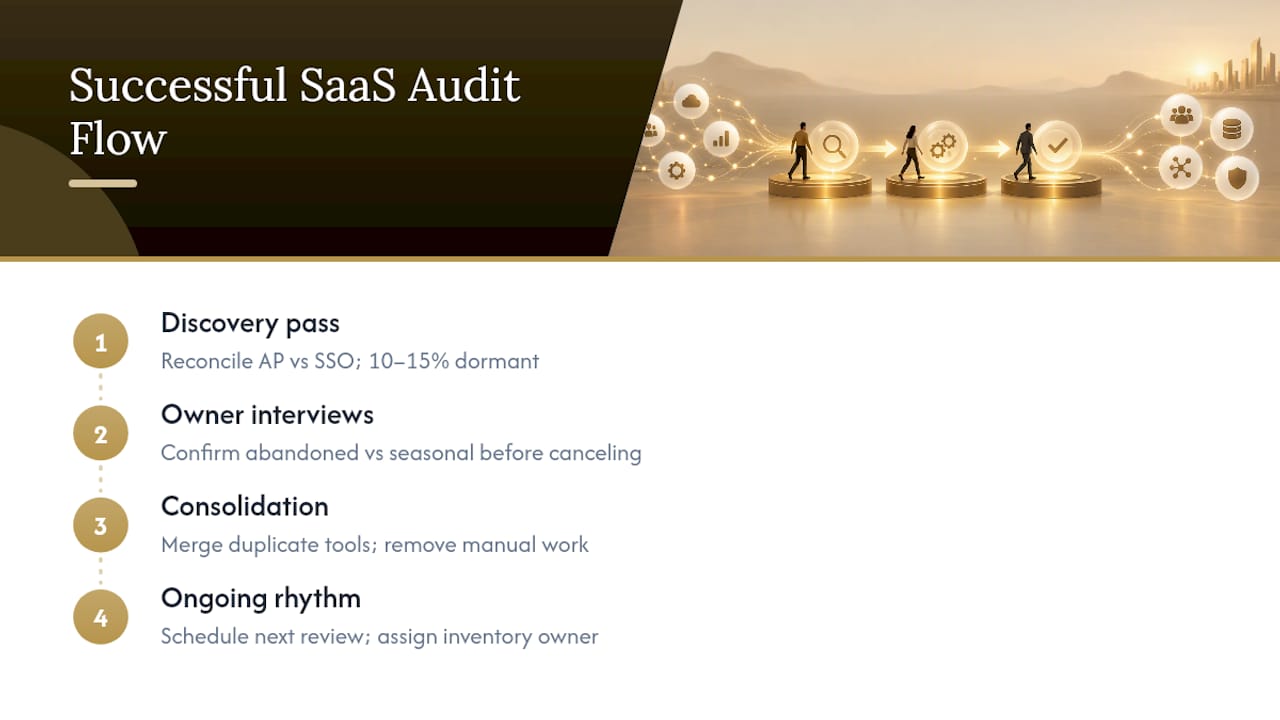
The pattern in organizations that get real value from an audit is consistent: they treat the first pass as a discovery exercise, not a cost-cutting mandate handed down from finance. A mid-size operations team that starts by reconciling AP data against SSO logs typically finds that 10 to 15% of their app catalog has zero login activity in the prior 90 days. Those aren’t always cancel-immediately candidates. Some are renewal insurance for seasonal tools, and some are simply forgotten.
The teams that succeed separate those two categories before touching anything. They interview the presumed owner of each dormant app, confirm whether it’s truly abandoned or just used rarely for a specific event, and only then move to cancellation. Skipping that interview step is the single most common reason audits create outages or lost data instead of savings.
Consolidation tends to deliver the second wave of gains. When marketing and sales each run a separate project management tool doing the same job, merging them onto one platform doesn’t just cut a subscription. It removes the manual data reconciliation someone was doing between the two systems every week, which is a cost that never shows up on an invoice but shows up everywhere in lost time.
The audits that stall usually share one trait: they treat the review as a one-time event instead of the first cycle of an ongoing rhythm. Three months after the spreadsheet gets filed away, the same orphaned seats and duplicate tools start reappearing, because nobody assigned ownership for keeping the inventory current. The organizations that hold their gains are the ones that schedule the next review before finishing the first one.
Which Metrics Actually Tell You the Audit Worked
Cost savings is the easiest metric to report and the least complete one on its own. A useful audit tracks a handful of numbers together, because each one alone can mislead.
Spend per active user matters more than total license count, since a shrinking headcount with flat spend signals seats nobody reclaimed. License utilization rate, active users divided by seats purchased, exposes tier creep and orphaned accounts in a single number; anything consistently under 60% deserves a right-sizing conversation. Renewal lead time, how many days before a contract renews that someone actually reviewed it, tells you whether your governance rhythm is working or whether you’re still reacting to auto-renewals after the fact.
Redundancy count, the number of apps performing overlapping functions across teams, is a metric most organizations never track until an audit forces the comparison. Time to offboard access, how long an account stays active after an employee departs, is as much a security metric as a cost one, and it belongs in the same dashboard rather than a separate security report.
None of these numbers means much in isolation. A high utilization rate on an app with no assigned owner and admin credentials shared across six people is not a success story, it’s a different kind of risk. The audits that hold up over multiple cycles report these metrics together, quarter over quarter, so a leadership team can see whether the gains from the first review are compounding or quietly eroding.
Connecting Audit Findings to Business Strategy
An audit that produces a list of canceled apps but never touches the annual planning conversation is a wasted opportunity. The findings only matter if they change how the organization spends and hires next year, not just this quarter’s invoice.
Start by mapping the audit’s redundancy findings against your product or growth roadmap. If three teams each bought overlapping analytics tools, that’s not just duplicate spend, it’s a signal that reporting ownership is unclear across the organization, and that’s a structural question worth raising with leadership, not just a line item to cut. The decision filter criteria you build during the scoring step should become the same criteria used to evaluate every new software request going forward, so the audit’s discipline doesn’t evaporate the moment a new department head wants a new tool.
Tie the reclaimed budget explicitly to a strategic priority instead of letting it disappear into general overhead. If the audit frees up six figures in annual spend, earmark a portion for a system that actually supports the next 12 months of growth, whether that’s better customer data infrastructure or a platform your operations team has been requesting. That reframes the audit from a defensive cost exercise into a funding source for what the business actually needs next.
Finally, put the audit’s cadence, not just its results, in front of whoever owns the annual budget cycle. A CFO or operating leader who understands that this review happens quarterly, not once every few years, will plan software budgets with more realistic assumptions and fewer surprise renewals landing mid-year.
Common Pitfalls That Derail a SaaS Audit
Most audits don’t fail from lack of effort. They fail from a handful of predictable mistakes that show up in almost every organization running its first review.
The most common one is starting the audit as a cost-cutting mandate rather than a discovery exercise. When department heads hear “audit,” they hear “budget cut,” and they get defensive about tools they actually need, which slows down honest reporting on usage. Framing the first pass as inventory building, with decisions coming later based on data, gets more honest answers.
The second pitfall is relying on a single data source. Finance records alone miss personal-card purchases. SSO logs alone miss apps that don’t use single sign-on at all. Every audit that skips the four-source reconciliation, AP, contracts, SSO, and app-admin exports, ends up with an incomplete list and false confidence in it.
The third is skipping the integration map before canceling anything. An app with low login frequency can still be the anchor for three other tools’ data feeds, and cutting it without checking breaks things nobody expected. The fourth is treating the audit as a one-time project instead of building the recurring cadence from day one, which guarantees the same waste returns within a year or two.
The fix for all four is the same discipline: multiple evidence sources, an owner assigned to every finding, an integration check before any cancellation, and a calendar entry for the next review before this one is declared finished.
What This Audit Process Gets Wrong in Most Advice You’ll Read
Most guidance on SaaS audits treats the exercise as a spreadsheet problem. Build the list, sort by cost, cancel the bottom quartile, declare victory. That advice produces exactly the kind of outage or broken integration that makes a management team distrust the whole exercise the next time someone proposes one.
The other overrated idea is that a single annual audit is enough. It isn’t. The organizations that keep their gains are the ones that build the quarterly rhythm before they even finish counting the first round of savings. If you take one thing from this playbook, take the calendar habit over the spreadsheet template. The template you can rebuild. The habit is what actually protects the budget a year from now.
Where Commerce Catalyst Fits After the Audit Is Done
An audit tells you where the waste is. Turning that list into prioritized action, the kind that actually shows up in your cash flow next quarter, is a different skill, and it’s the one most internal teams run out of time for. Commerce Catalyst works directly with consumer brand founders and operators to close that gap, translating audit findings and other financial complexity into decisions you can act on without hiring a full finance department.
A typical engagement starts with the DTC Operator Diagnostic, a $197 one-time review that pinpoints the operating constraints actually holding back cash flow, SaaS spend among them, and hands you a prioritized action list instead of a generic report. For a deeper look specifically at cash-impacting fixes, the Financial Health Assessment digs into where reclaimed budget should go next. If you’d rather talk through your specific numbers first, the Founder Advisory service gives you direct, hands-on guidance from someone who has run these decisions inside an actual consumer brand, not just consulted on one. Start with the diagnostic if you want a fast readout, or book a session directly if you already know what’s stuck.
Sources
Six evidence sources cover most organizations: AP or ERP records and corporate-card transactions, your contract and invoice repository, SSO or IDP application catalogs, direct app-admin exports, employee expense submissions, and network or browser discovery data for the apps nobody remembered to register.
- CIS Control 2: Inventory and Control of Software Assets
- IT Asset Management (NIST SP 1800 series / ITAM guidance)
- The comprehensive guide to SaaS spend improvement | BetterCloud
Manual reconciliation works fine under roughly 50 to 75 applications. Past that, SaaS management platforms pay for themselves in recovered seats and avoided auto-renewals within a single review cycle.
FAQ
What Is a SaaS Stack?
A SaaS stack is the complete set of cloud software subscriptions an organization pays for across every team, from core systems like your CRM down to a single-user design tool. Most organizations underestimate their stack size until they run a formal reconciliation, since so many subscriptions are approved outside a central procurement process.
Is SaaS Being Replaced by AI?
No. AI tools are mostly delivered as SaaS themselves, and they’re adding to stacks rather than replacing the software category. What is changing is scrutiny: as AI features get bundled into existing tiers, audits increasingly need to check whether you’re paying for AI capability you’re not actually using.
What Are the Types of Audit Procedures Used in a SaaS Review?
A SaaS stack audit typically combines several procedures: inventory reconciliation across finance and identity systems, usage analysis, contract and renewal review, security and access validation, integration dependency mapping, cost-per-user calculation, and a final decision scoring pass. Each procedure feeds the same keep, right-size, consolidate, renegotiate, replace, or retire outcome.
What Does SaaS Stand For?
SaaS stands for Software as a Service, meaning software hosted and maintained by a vendor and accessed by subscription rather than installed and owned outright. That subscription model is exactly why SaaS spend is so easy to lose track of: there’s no capital purchase to trigger a review, just a recurring charge that renews quietly until someone audits it.
How Often Should We Run a SaaS Stack Audit?
Run a full inventory refresh at least bi-annually, with quarterly checks on seats, accounts, and upcoming renewals, and monthly reviews of new spend. That cadence, drawn from CIS Control 2, is what keeps waste from rebuilding between full reviews.